What it is
Grant Finder is a Claude plugin that helps nonprofit staff find grant opportunities without leaving Claude. Describe your organization (mission, sector, location, size) and it surfaces highly relevant matches: private foundations that have funded organizations like yours, and open public and federal opportunities you're eligible for.
Every match comes with the reasoning behind it: mission alignment, eligibility fit, historical giving patterns, typical grant size, geographic focus. Because it's a conversation rather than a search box, you can go as deep as you want. Ask why a funder was suggested, dig into their full grant history, rule one out and get more like it, or have Claude turn the shortlist into a prioritized plan.
Free to use, no signup required.
How to use
What you'll need
- The Claude desktop app, on macOS or Windows.
- A paid Claude plan. Grant research runs long, and the free tier's limits will cut it short.
Use it in Claude Cowork
Cowork is the best place to run this. Grant prospecting is a long, multi-step job: querying filings, cross-referencing funders, checking live application windows on a dozen websites. Cowork lets that run as background work you can walk away from, and hands you a written report at the end rather than a chat transcript.
Install the plugin
-
Download
grant-finder.zipfrom the latest release on GitHub. - In the Claude desktop app, open Settings, then Customize, then Plugins.
- Upload the zip file you just downloaded, then make sure the plugin is enabled.
-
Open Connectors and check that both of the plugin's connectors are
connected: IRS 990 (
irs990-filings-grants) and grants.gov (grants-gov).Don't skip this. Until both connectors are connected, Grant Finder has no data to search and Claude will fall back to guessing.
- Start a new conversation and describe your organization. Claude picks the right workflow on its own, so there are no commands to memorize.
Sample prompts
-
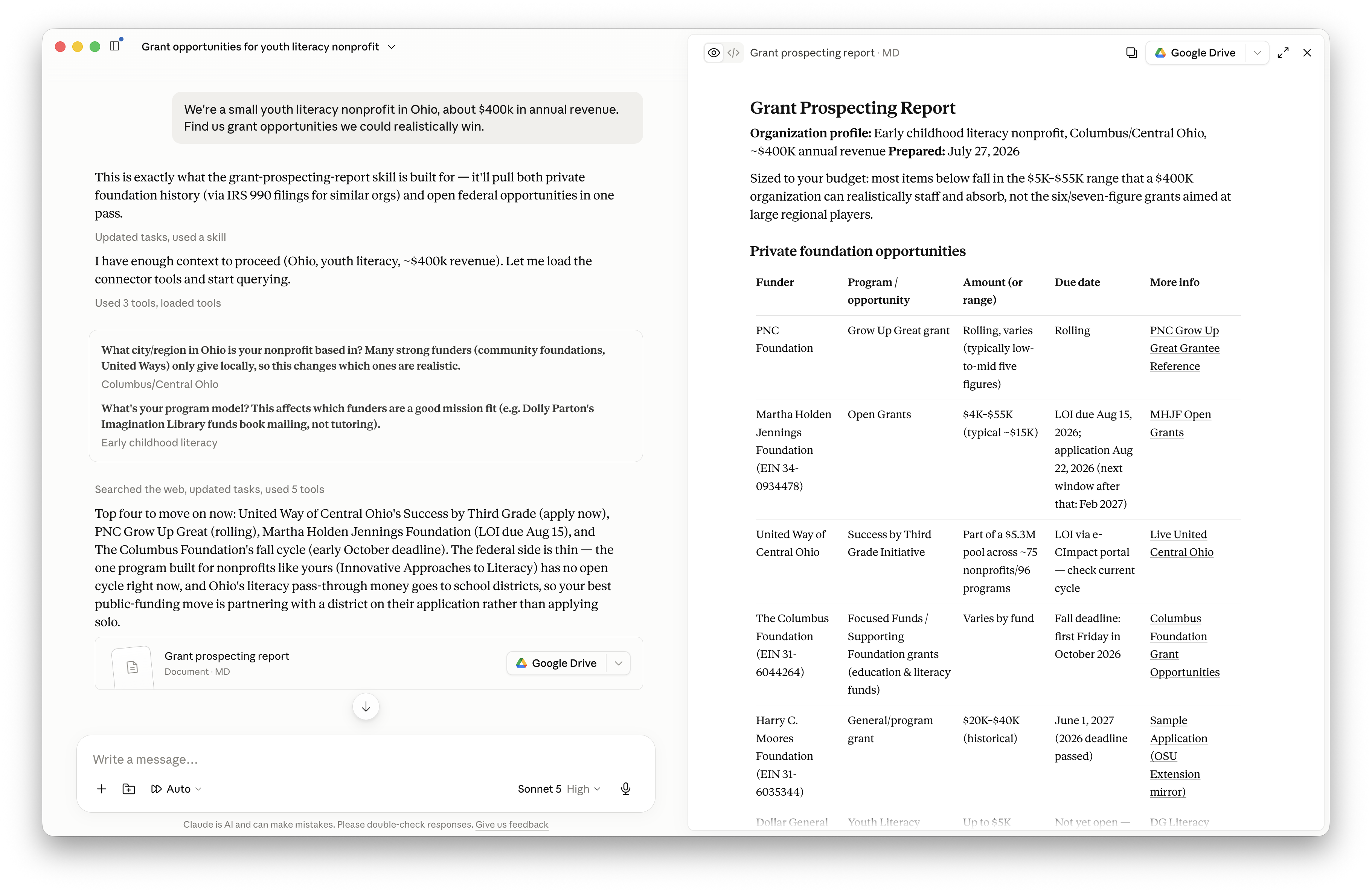
We're a small youth literacy nonprofit in Ohio, about $400k in annual revenue. Find us grant opportunities we could realistically win.
-
Which private foundations have funded food security work in the Bay Area in the last few years?
-
Show me open federal grants a 501(c)(3) can apply to for after-school STEM programs, closing in the next 90 days.
-
Build me a profile of the Hewlett Foundation before we approach them. What do they fund, how much, and who have they funded?
-
Put together a full prospecting report for our organization, private foundations and federal opportunities in one list.
How it works
Grant Finder gives Claude direct access to a few open datasets as a starting point: IRS Form 990 filings, including the grants every foundation reports paying out, and grants.gov's open opportunity data. From there it relies on the model's own reasoning plus live web search to turn that history into actual opportunities. Who funds work like yours, whether they're accepting applications right now, and what their current program priorities look like.
It's not just a fancy prompt. The datasets are real, queryable connectors, and the research workflows are structured skills the model follows.
How that differs from a commercial grant database
Feedback welcome
This project is experimental. If you try it, here's what I'd love to know:
- Was it useful? Did it turn up anything you'd actually pursue?
- Was it easy to use, or did you get stuck somewhere?
- What would make it better?